DiVert Implementation Guide
Introduction
Divert is a payment solution that enables merchant to request payment from cardholdes for services rendered.To generate a payment link, transaction details and intended recepient information are required. Once this information is provided, secure payment link is generated.The merchant can then share through their preffered communication channel, such as SMS or Whatsapp or alternatively, the iVeri Gateway can distributte the link via email
There are 2 ways to generate the payment link:
- Create payment links manually by logging into the iVeri merchant Portal
- Automate the payment link creation process using our API
Use Cases
Adhoc: Rendering of services such as plumbing, electricians
Hospitality: Additional charges that may not be included in the customers reservation
Subscription/Recurring: Where customers may have missed a scheduled payment, merchants can use payment links to collect funds from customerd
Create payment links via merchant portal
Set up & Customize Divert application:
- Login to the merchant portal
- Customize the payment request message, enable Transaction confirmation emails and more by referencing - https://www.iveri.com/docs/divert-backoffice-user-guide-257#configure-application-1597-12
- Customize the payment page by adding the logo and your brand colours - https://www.iveri.com/docs/divert-backoffice-user-guide-257#transaction-form-1597-13
Generate Payment link
- Complete the payment request form - Amount, email address, name, expiry, reference
- Send Link - payment request link will generated to your clients specified email address
- Alternatively, use generate URL into your emails, SMS, whatsAPP channel
Stay informed
- Receive transactions notifications when your clients make payments by implenting out of band transaction notifications or via email and merchant portal dashboard
DiVert API
Requirements
With the API, merchants are able to generate payment requests to their clients by implementing the “DebitRequest” command and include the specific data parameters that are expected in the message request to the Gateway. The data elements required in the “DebitRequest” command are covered in the Enterprise Documentation
In order to implement the DebitRuquest method, the following should be in place.
- Reference this implementation guide
- Reference the “RequestDebit” method in the Enterprise Documentation
- Merchant Agreement with an acquirer with Divert as the solution which will result in a merchant profile on the Gateway
DiVert Functionality
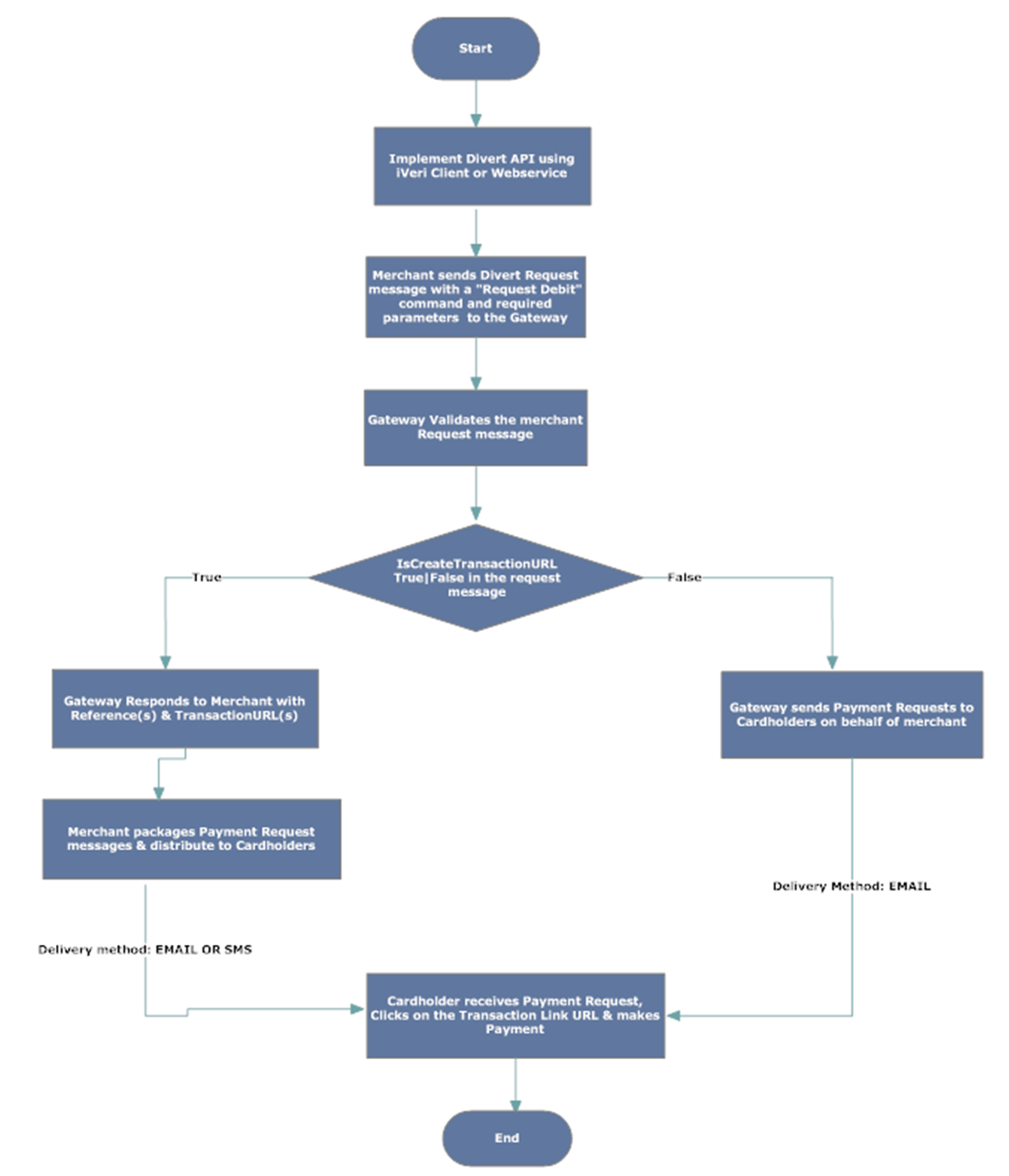
The Divert API has a parameter “CreateTransactionUrl” that can be set to either “True or “False”. The value set determines how the Gateway handles and processes the message request.
Scenario 1
- If CreateTransactionUrl” is set to“True” - the Gateway generates a transaction URL and makes a callback to the merchant with the URL.
- The merchant can then construct and format their own message, including the URL (returned by the Gateway) and distribute the message to their cardholder using either SMS|Email
- When the cardholder receives the messages, it will have all the particulars of the merchant, the cardholder can then click on the URL, and be redirected to a payment page wherein they can make a payment to the merchant
Scenario 2
If CreateTransactionUrl is set to “False” – the Gateway processes the request, packages the payment request and distributes into the cardholder’s specified email address on behalf of the merchant
When the cardholder receives the messages, it will have all the particulars of the merchant, the cardholder can then click on the URL and be redirected to a payment page wherein they can make a payment to the merchant
Divert - Payment Link Parameters
The table below carries the applicable parameters for merchants intending to implement our API
Mandatory | |
O | Optional |
C | Conditional |
blank | not relevant |
DiVert Parameter per Action
t | Parameter | RequestForDebit | RequestForAuthorisation |
Core | ApplicationID | M | M |
Core | Category | M | M |
Core | CertificateID | M | M |
Core | Gateway | O | O |
Core | Command | M | M |
Core | Mode | M | M |
Common | Amount | M | M |
Common | Currency | M | M |
Common | MerchantReference | M | M |
Common | CardholderName | M | M |
Common | CardholderEmail | C | C |
Common | OrderDescription | O | O |
Common | AllowBudgetPeriod | O | O |
Common | RequestExpiryDate | O | O |
Common | CreateTransactionUrl | O | O |
Format: JSON
Content-Type: Application/json
DiVert API Process Flow
Batch Upload File XML Specification
The Divert Batch Upload Data Elements
The Divert Batch XML upload file uses the following logic:
- The <Divert> element can occur multiple times
- The <DivertItem> element can occur multiple times under a <Divert> element
- The Application ID used in the <DivertItem> elements should be the same through-out the <Divert> element
Divert attributes
Tag Name | Length | Data Type | Format | Description |
Amount | <=12
| Numeric
|
| The sum of the Amount sub-element values of all the <DivertItem> sub-elements |
Count | <=6 | Number |
| The number of <DivertItem> sub-elements |
Divert sub-elements
Tag Name | Length | Data Type | Format | Description |
Date |
8 |
Numeric |
YYYYMMDD | The date when the batch was created (in which case the batch will be processed on the upload date) or a future date on which the batch should be processed (a past or future date cannot be more than 1 calendar month from the upload date)
|
Filename | <=64 | Text |
| The Filename by which the Divert batch can be identified (must be unique for all Divert batches uploaded for an ApplicationID)
|
CreateTransactionUrl |
| Boolean | True|False | Used to generate the URL to which a payment can be made by the cardholder. When this value is set to ‘true’ a ‘TransactionUrl’ will be returned to the merchant, the merchant can then distribute the payment requests with this URL using their preferred comms. If set to ‘false’ a debit request email will be sent by the gateway on behalf of the merchant to the ‘CardholderEmail’ |
DivertItem |
|
| XML element | An element for each transaction in the Divert Batch, this can occur multiple times within a <Divert>
|
DivertItem Attributes
Tag Name | Length | Data Type | Format | Description |
Application ID | 38 | GUID | {00000000-0000-0000-0000- 000000000000}
| The ApplicationID allocated generated by the gateway during merchant capture (the same ApplicationID must be used for all DivertItem elements under a Divert element)
|
Mode | 4 | Text | Test|Live | The mode of an ApplicationID |
Command | <=64 | Text | Debit|Authorisation|Credit| | The Transaction Type to be used |
DivertItem sub-elements
Tag Name | Length | Data Type | Format | Description |
Amount | <=12 | Numeric |
| The transaction value in cents ( no decimal point)
|
Currency | 3 | Alpha |
| The iSO currency code in which the transaction will be processed in ie. ZAR or USD |
OrderDescription | <=255 | Text |
| A description of the Divert Batch |
MerchantReference | <=64 |
|
| Unique merchant reference for this transaction. Must be unique for each DivertItem with Divert uploaded for an Application ID(normally this an Invoice Number) |
AllowBudgetPeriod |
| Boolean | True|False | The number of months over which the cardholder would like to pay the transaction off. |
CardholderName | <=50 |
|
|
|
CardholderEmail | <=128 | String |
| The cardholder email address which the merchant will send payment request to |
RequestExpiryDate | 8 | Numeric | YYYYMMDD | A future date which can be specified by the merchant on the validity period of the Divert payment request. If the date elapses and the request has not been processed by the cardholder the request will expire. |
DiVert Batch Result File
DiVert Batch Result File Data Elements
The result file data elements described in this section are returned to the merchant when the <CreateTransactionURL> in the “DivertUpload” file is set to “True”. Merchants can use the returned data elements to create and format their own payment request messages and send the requests to their cardholder using their own delivery method i.e. SMS|EMAIL
The Divert Batch has the following logic:
- The <Divert> element can occur multiple times
- The <DivertItem> element can occur multiple times under a <Divert> element
Divert Attributes
Tag Name | Length | Data Type | Format | Description |
Amount | <=12 | Numeric |
| The sum of the Amount sub-element values of all the <DivertItem> sub-elements
|
Count | <=6 | Number |
| The number of <DivertItem> sub-elements
|
Divert sub-elements
Tag Name | Length | Data Type | Format | Description |
Date | 8 | Numeric |
| The date when the batch was created (in which case the batch will be processed on the upload date) or a future date on which the batch should be processed (a past or future date cannot be more than 1 calendar month from the upload date)
|
File Name | <=64 | Text |
| The Filename by which the Divert batch can be identified (must be unique for all Divert batches uploaded for an ApplicationID)
|
CreateTransactionUrl | Boolean |
| True|False | Generated URL to which a payment can be made by the cardholder. |
DivertItem |
|
| XML element | An element for each transaction in the Divert Batch, this can occur multiple times within a <Divert>
|
DivetItem Attributes
Tag Name | Length | Data Type | Format | Description |
Application ID | 38 | GUID | {00000000-0000-0000-0000- 000000000000}
| The ApplicationID allocated generated by the gateway during merchant capture (the same ApplicationID must be used for all DivertItem elements under a Divert element) |
Mode | 4 | Text | Test|Live | The mode of an ApplicationID |
Command | <=64 | Text | Debit|Authorisation|Credit| etc. | The Transaction type used |
RequestID | 38 | GUID | {00000000-0000-0000-0000- 000000000000} | A unique identifier for the transaction allocated by iVeri |
DivertItem sub-elements
Tag Name | Length | Data Type | Format | Description |
TransactionURL | <=255 | Text |
| This will be returned to the merchant in the result file if the ‘CreateTransactionUrl’ parameter set to ‘True’
|
MerchantReference | <=64 | Text |
| Unique merchant reference for this transaction. Must be unique for each DivertItem with Divert uploaded for an Application ID(normally this an Invoice Number) |
DiVert Batch Upload Response Code
Error Description | Possible Reasons |
Not a valid payment request Batch file | Can occur due to the following reasons:
|
DiVertItem element Command attribute not valid | Check the Command file |
Invalid Date | Make sure date is provided and on the correct format |
User, Administrator, you have already uploaded a file, Teswa.XML, with applicationId, 8c4adb24-bda4-473b-af75-e4c4cd85ee05.
| File with the same name already uploaded |