LiteBox Hosted Payment Page
LiteBox Hosted Payment Page
The LiteBox hosted payment page is an e-commerce solution that allows merchants to connect, send payment requests to the iVeri Payment Gateway without redirecting the cardholder away from their website. When implemented, the LiteBox pops up and sits in-front of the merchant’s website. From a merchant/cardholder point of view the LiteBox solution provides a more seamless checkout experience. |
|
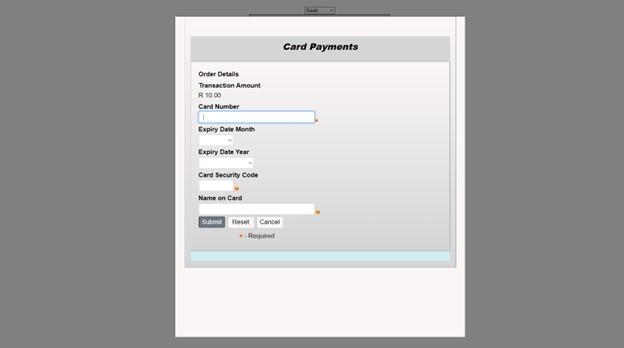
An example is available online on this link. To simulate the LiteBox behaviour, click on “Modal”.
|
<meta name="viewport"
content="width=device-width, initial-scale=1.0" />
- a reference to the "jquery.min.js" script
- a reference of the "bootstrap.min.css" styles
- a reference to the "bootstrap.min.js" script
<script src="https://[endpoint]/scripts/jquery/js/jquery.litebox.js"></script>
|
Notes: (1) JQuery and Bootstrap resources can be found publicly online. (2) It is recommended to reference the JS and CSS files from your own environment. (3) Replace “[endpoint]” with the appropriate gateway address.
Step Two: Place the LiteBox button to be used to trigger the LiteBox page in the body tag, the merchant developer can set the color, and the label of their own choosing for the button. Download the JavaScript library that handles the button on https://[endpoint]/scripts/jquery/js/jquery.litebox.js . Also, to note is that the jQuery uses an id attribute on the HTML elements.
|
<!--
Button HTML -->
<a
id="iveri-litebox-button">Make Payment</a>
<!-- Modal HTML -->
<div
id="iveri-litebox"></div>
|
Step Three: Initialize the LiteBox. Define event handlers for the data that is to be returned from the gateway and when the LiteBox closes. |
<script>
liteboxInitialise(portalUrl); // pass the
appropriate gateway address or endpoint
function liteboxComplete(data) {
/Place your code to handle the response here
}
</script>
|
Step Four: Data returned to the merchant is JSON formatted The following parameters are some of the data elements returned to the merchant, some of which will only be returned if present in the request message. Data parameters that can be passed to the iVeri gateway as part of the transaction request can be referenced in 8.2 iVeri Lite Specification
- Lite_Merchant_ApplicationId
- Lite_Merchant_Trace
Ecom_Payment_Card_Number - Ecom_Payment_Card_ExpDate_Month
- Ecom_Payment_Card_ExpDate_Year
- MerchantReference
- Lite_Order_Amount
- Lite_Order_Terminal
- Lite_Order_AuthorisationCode
- Lite_BankReference
- Lite_TransactionDate
- Lite_TransactionIndex
- Lite_Payment_Card_Status
- Lite_Result_Description
|