Support process
Log
The issue is reported to First Line Support.
Investigate
First Line Support investigates and may escalate to Second Line Support or development.
Resolve
The iVeri specialist investigates, confirms information and provides updates until resolution.
Review
A service rating request and scheduled service discussions support continuous improvement.
Log it right. Resolve it faster.
Please include the following when logging a ticket:
- A clear description of the problem
- The date and time the issue started
- Your Merchant ID
- Transaction date, time and amount
- First four and last four card digits only
- The error message, where applicable
- Terminal or device serial number
- Evidence or examples of affected transactions
- Troubleshooting steps already completed
How to log a support call
All support queries must first be logged with First Line Support.
Email: assist@iveri.com
Contact centre: +27 11 269 4000 (option 1), to follow up on a logged query.
Need to escalate?
First escalation: Head of Business Development.
Second escalation: Head of Services.
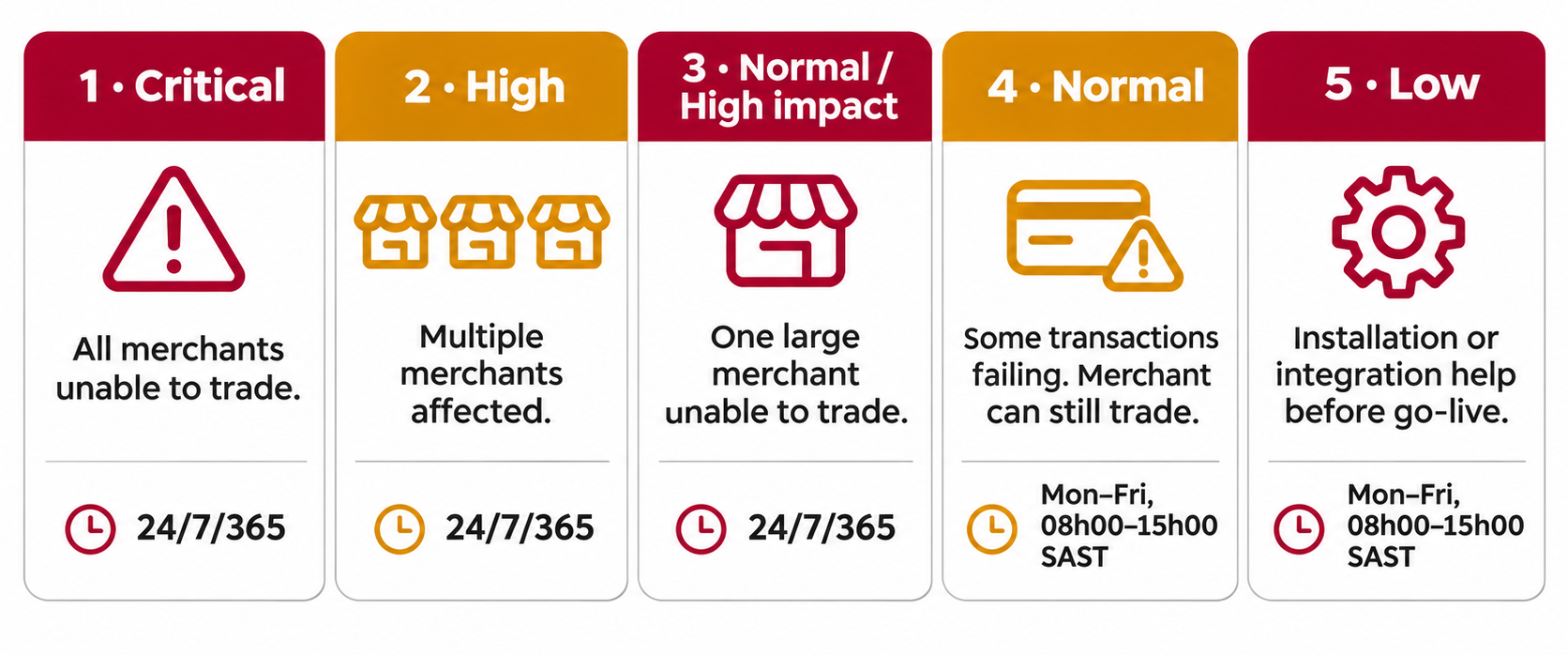
Severity levels
When a call is received we assess the business impact (how many merchants are affected and whether they can trade), route it to the appropriate support team, resolve or escalate, and keep you updated until resolution.