- Lite Developer's guide
-
Overview
- Overview of iVeri Lite - The Hosted Payment Page
- Payment Features
- iVeri Lite Process Flow
-
Getting Started With Lite
- Registering as a merchant
- Development phase
-
Test phase
- Test phase
- Live phase
- Gateway Addresses
-
Integration Methods
- General Requirements
- Full Redirect – Hosted Payment Page
-
LiteBox Hosted Payment Page
- LiteBox Hosted Payment Page
- Shopping Carts
- Parameters
- Query Transaction Status
- Transaction Notification
- Additional Variables
-
Introduction to 3D Secure
- 3D secure transaction process flow
-
Tokenisation: Transactionindex On Subsequent Transactions
- Initial Transaction
- Subsequent Transactions
- Subsequent Transactions implementation
-
Merchant Hash Token Generation
- Prerequisites
-
Requirements
- Requirements
- Token Verification Logic in the Hosted Payment Page
-
Merchant Hash Token Generation
- Merchant Hash Token Generation
-
VISA Checkout with Lite
- Process Flow in Visa Check-Out with Lite
- Illustration of Visa Check-Out Process With iVeri Lite
- Distributors Contact Information
- Lite Developer's guide
- Overview
- Overview of iVeri Lite - The Hosted Payment Page
- Payment Features
- iVeri Lite Process Flow
- Getting Started With Lite
- Registering as a merchant
- Development phase
- Test phase
- Test phase
- Live phase
- Gateway Addresses
- Integration Methods
- General Requirements
- Full Redirect – Hosted Payment Page
- LiteBox Hosted Payment Page
- Shopping Carts
- Parameters
- Query Transaction Status
- Transaction Notification
- Additional Variables
- Introduction to 3D Secure
- 3D secure transaction process flow
- Tokenisation: Transactionindex On Subsequent Transactions
- Initial Transaction
- Subsequent Transactions
- Subsequent Transactions implementation
- Merchant Hash Token Generation
- Prerequisites
- Requirements
- Requirements
- Token Verification Logic in the Hosted Payment Page
- Merchant Hash Token Generation
- VISA Checkout with Lite
- Process Flow in Visa Check-Out with Lite
- Illustration of Visa Check-Out Process With iVeri Lite
- Distributors Contact Information
Lite Developer's guide
The iVeri range of payment solutions, developed by iVeri Payment Technologies (Pty) Ltd provides proven credit card payment solutions for businesses that have online or physical presence. LIte is an online payment product.
Overview
Overview of iVeri Lite - The Hosted Payment Page
The iVeri Lite hosted payment page is an ecommerce solution designed for merchants who want to accept card payments in their online stores. The iVeri Lite hosted payment page can be integrated in one of three ways:
- Full Redirect -
A full Redirect to
the Hosted payment page shifts the interaction of the shopper/buyer away from
the merchant’s website and only goes back to the merchant website when the
transaction is complete.
- LiteBox - The LiteBox hosted payment appears or pops up within the merchant’s website, the merchant’s website remains unchanged, providing for a more user friendly and seamless checkout experience for both cardholder and merchant.
- Shopping Carts - The iVeri Lite hosted payment page is integrated to some of the commonly used shopping carts.
The types of cards, transaction types,
and payment methods accepted depend on the acquiring bank and merchant
agreements.
Payment Features
Depending on the acquirer involved, iVeri Lite has the capacity to offer the following payment methods:
Card:
- VISA
- MasterCard
- AMEX
- Diners
- UPI
Mobile Money
- EcoCash
- M-Pesa
Additional payment methods:
- MasterPass
- Visa Checkout
- Visa Account Funding Transactions
- Mastercard Funding Transactions
Account-to-Account Transfer:
- Ozow
Other functionalities available:
- 3DSecure: iVeri Lite, being an e-commerce product, allows for 3DSecure protocol for payer authentication in online transactions, if configured accordingly.
To learn more about 3D Secure, visit this page. - Fraud Management
- Transaction history reporting
- Merchant Portal - BackOffice: Merchant Portal includes features that are merchant-specific such as reporting, payment page customization, and general configurations. More on iVeri Lite BackOffice features can be found on this page
iVeri Lite Process Flow
iVeri Lite requires very little integration and is aimed at Internet merchants who have limited technical resources. Lite transactions are processed on a web site and secured via an SSL certificate without the merchant having to buy SSL since iVeri lite takes care of it on their behalf. Although ideal for websites with small catalogs, iVeri Lite still provides a powerful processing engine.
Process Flow
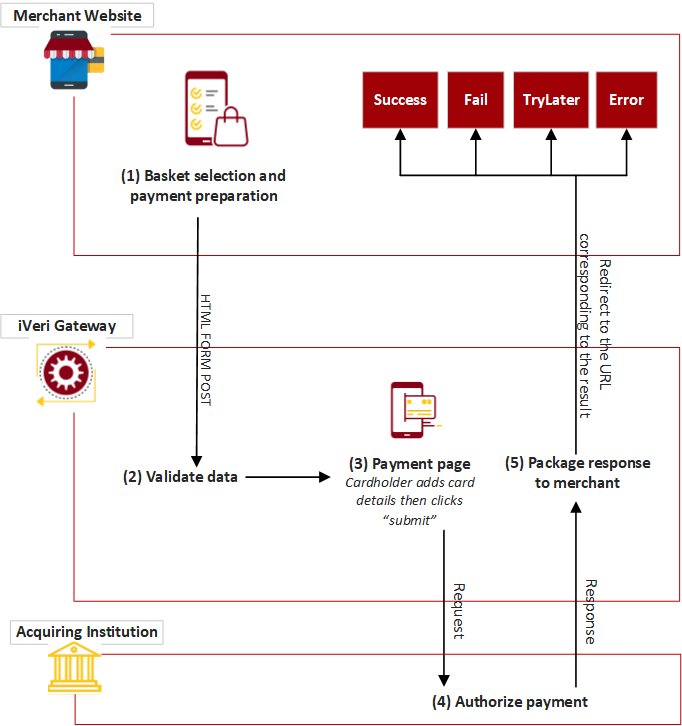
This diagram illustrates the flow of events of an iVeri Lite transaction:
Process Flow Description:
(1) The cardholder is at the point in the purchase process where the basket has already been selected and he is now on the brink of paying for it. The website thus knows the price of the basket, the Invoice Number (the merchant could also have iVeri BackOffice allocate the Invoice number for them by using the “AUTOGENERATE” option) .
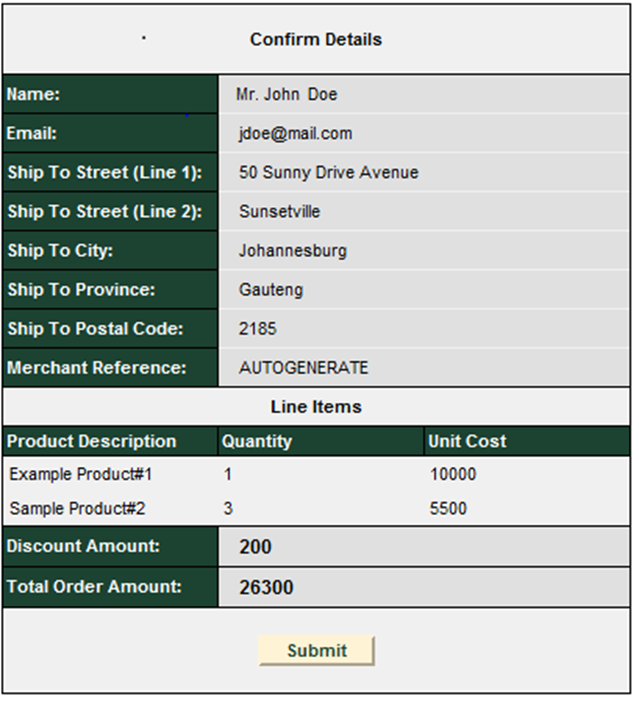
(2) Once the “Submit” button has been clicked, the customer’s captured details are sent to the Gateway verifying that the ApplicationID is valid, validating the variables i.e. purchase amount is an integer and that all required fields have been populated.
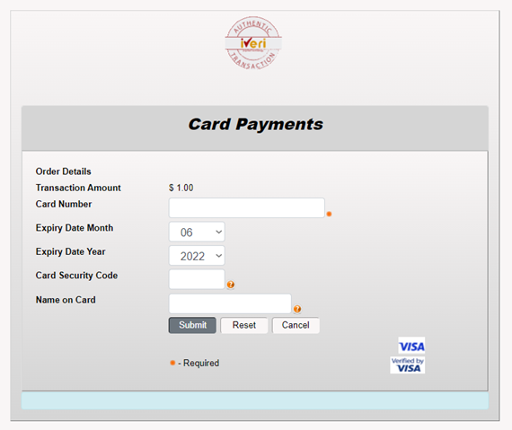
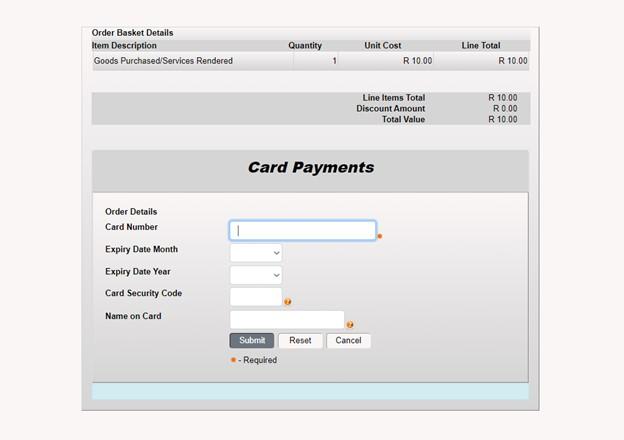
(3) The customer’s card details are captured on a SSL secured website where, after clicking on the Submit button, validation of the entered values (i.e. credit card number, expiry date…) will take place. Once validation has succeeded a “Please wait ......” message is returned to the cardholder while the transaction is in process
Authorization is performed at the respective acquiring financial institution/department who will then interact with the issuing financial institution/department.
(4) The return of an authorization can be either of the following:
successful, failed, system error or please try again later.
A redirect is sent to the cardholder’s browser telling it which Result URL to display.
(5) In the event of a successful/error transaction the cardholder as well as the Merchant can be emailed a statement indicating the successful completion of the transaction. Those transactions can be tracked via the BackOffice.
(6) A success/error page is returned to the cardholder by the merchant to show the transaction type, transaction amount, authorization code, merchant reference and purchase date
Getting Started With Lite
Registering as a merchant
Merchant account can be attained by registering with an acquiring bank, a list of which can be found on this page
Development phase
At this stage you will proceed with development based on the integration method you have selected, and may reach out for your contact at the acquiring bank if you require support.
Test phase
Test phaseThe iVeri Gateway provides a mechanism where a merchant can
perform test transactions that are routed to an iVeri Gateway issuer simulator.
This enables a merchant to complete testing within the test environment. When
the merchant is ready to process LIVE transactions, the acquiring bank can
activate the merchant profile for LIVE processing which will be routed to the
genuine card issuer.
|
Non-3DS iVeri Gateway test cards:
| ||||||||||||||||||||||||||||||
| ||||||||||||||||||||||||||||||
BANKSERV (3DS 2)
| ||||||||||||||||
|
| ||||||||||||||||
|
| ||||||||||||||||
CYBERSOURCE (3DS 2)
The Card Security Code (CVV) Field can be kept empty or set to any three numbers for testing purposes.
If you want to generate the error “Invalid Expiry Date”, make the expiry date in the past.
| ||||||||||||||||||||||||||
| ||||||||||||
Gateway Addresses
| ||||||||||||||||||||||||||||||||||||
| ||||||||||||||||||||||||||||||||||||
Integration Methods
General Requirements
iVeri Lite implementation consists of doing a submission of a form post to the Gateway endpoint while including all required/mandatory parameters.
Applicable Parameters to be passed in the request are common to all the integration methods supported on iVeri Lite, and elaborated in this documentation.
The list of applicable parameters can be found here
LiteBox Hosted Payment Page
|
|
An example is available online on this link. To simulate the LiteBox behaviour, click on “Modal”. |
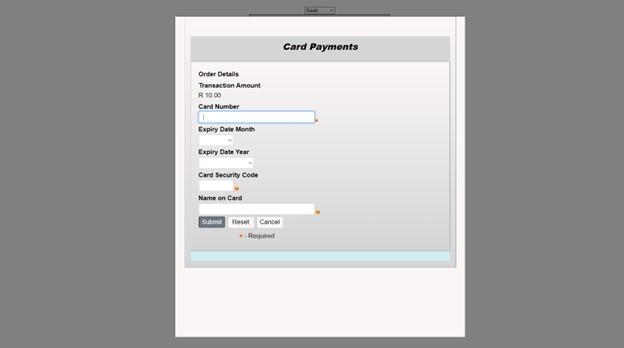
|
LiteBox Implementation Steps: Step One: In order for the LiteBox to render correctly to the device being used and to connect to the appropriate gateway end point the below must be defined on the head tag |
<meta name="viewport" content="width=device-width, initial-scale=1.0" />
- a reference to the "jquery.min.js" script
- a reference of the "bootstrap.min.css" styles
- a reference to the "bootstrap.min.js" script
<script src="https://[endpoint]/scripts/jquery/js/jquery.litebox.js"></script>
|
Notes: (1) JQuery and Bootstrap resources can be found publicly online. (2) It is recommended to reference the JS and CSS files from your own environment. (3) Replace “[endpoint]” with the appropriate gateway address. Step Two: Place the LiteBox button to be used to trigger the LiteBox page in the body tag, the merchant developer can set the color, and the label of their own choosing for the button. Download the JavaScript library that handles the button on https://[endpoint]/scripts/jquery/js/jquery.litebox.js . Also, to note is that the jQuery uses an id attribute on the HTML elements. |
<!-- Button HTML -->
<a id="iveri-litebox-button">Make Payment</a>
<!-- Modal HTML -->
<div id="iveri-litebox"></div>
|
|
<script>
liteboxInitialise(portalUrl); // pass the appropriate gateway address or endpoint
function liteboxComplete(data) {
/Place your code to handle the response here
}
</script>
|
|
Shopping Carts
iVeri Lite plug-in is available for download for the following Shopping Cart platforms:
WooCommerce: https://www.iveri.co.za/docs/woocommerce-6
OpenCart:
https://www.iveri.co.za/docs/opencart-14
VirtueMart:
https://www.iveri.co.za/docs/virtuemart-15
Parameters
The following parameters are expected in the form submitted to the Gateway at step 3 of the iVeri Lite process flow and/or returned by the Gateway in the response at step 6 to the cardholder via the merchant's website.
Note: Not all of the fields in this specification are mandatory.The list of parameters below has been split to reflect mandatory and optional data.
You can simulate a test form post, using data corresponding to your request, on this link
Mandatory Parameters:
Name |
General Description |
Length |
Notes |
Lite_Merchant_ApplicationId |
iVeri Application id |
36 |
Allocated to the Merchant during registration |
Lite_Order_Amount |
Amount to authorize |
10 |
The total amount for the order including tax in cents. This must be equal to the sum of the lineamount*linequantity for each line item |
Lite_Website_Successful_Url |
Success End Url | 255 |
URL to pass control back to upon successful completion of a transaction. Control of the transaction is passed back to this URL if the Lite_Payment_Card_Status = 0 |
Lite_Website_Fail_Url |
Failed End Url |
255 |
URL to pass control back to if the authorisation is refused by the financial institution. Control of the transaction is passed back to this URL if the Lite_Payment_Card_Status is anything other than 0, 1, 2, 5, 9 or 255 |
Lite_Website_TryLater_Url |
Network error End Url | 255 |
URL to pass control back to if there is a system error which could be overcome by trying again later. Control of the transaction is passed back to this URL if the Lite_Payment_Card_Status = 1, 2, 5 or 9 |
Lite_Website_Error_Url |
Code error End Url | 255 |
URL to pass control back to if the form has not been filled in correctly of there is an inconsistency in the form. Control of the transaction is passed back to this URL if the Lite_Payment_Card_Status = 255 |
Lite_Order_LineItems_Product_# |
LineItem | 255 |
Line item of what is being ordered. The # indicates a number starting at 1 and incrementing by 1 for every line item. This is essentially a description of the item being ordered |
Lite_Order_LineItems_Quantity_# |
LineQuantity | 10 |
Line item Quantity of what is being ordered. The # indicates a number starting at 1 and incrementing by 1 for every line item. This is the number of units being ordered. |
Lite_Order_LineItems_Amount_# |
LineAmount | 10 |
Line item cost including tax if any of what is being ordered. The # indicates a number starting at 1 and incrementing by 1 for every line item. This is the unit price for this particular item. |
Lite_ConsumerOrderID_PreFix |
Autogenerate Invoice Extension | 5 |
If the Merchant sets the ECOM_CounsuremOrderID to “AUTOGENERATE" then this field is used to control the first 3 to 6 characters of the autogenerated consumerorderid E.g. “INV” set in this field will result in an autogenerated consumerorderid of “INV0001”, “INV0002” and so on. |
Ecom_BillTo_Online_Email |
Bill to email | 40 |
This is the email address the invoice would be mailed to. e.g., jsmith@isp.com |
Ecom_Payment_Card_Protocols |
Payment protocols available | 20 |
A space separated list of protocols available for a specified card. Initial list of case insensitive tokens: "none", "set", or "setcert". "Set" indicates usable with SET Protocol (i.e., is in a SET wallet) without a SET certificate. "Setcert" indicates same but does have a SET certificate. "None" indicates standard is being used but wallet is not SET capable or the card has not been entered into the SET wallet. Usually a hidden field. |
Ecom_ConsumerOrderID |
Consumer generated order ID | 20 |
unique order ID generated by the consumer software. If at all possible, this should be filled out. If it is impossible iVeri will generate one for you but it should preferably be filled out by the merchant. For iVeri to create a unique ordered for you please set this to "AUTOGENERATE" and refer to the Lite_ConsumerID_PreFix which enables you to specify the first few letters of the invoice |
Ecom_TransactionComplete |
End transaction flag | - |
A flag to indicate that this web page/aggregate is the final one for this transaction. Usually a hidden field. |
Optional Parameters:
Name |
General Description |
Length |
Notes |
Lite_Version |
Version |
5 |
Set to current Version number ex. 4.0, for Old Version left blank – Not available. |
Lite_Payment_Card_Status |
iVeri Status |
10 |
Status of transaction received in response |
Lite_Merchant_Trace |
MerchantTrace |
64 |
Unique merchant identification for the request. This value can be used by the merchant to confirm the status of the transaction if need be. Appendix D |
Lite_Recurring_Payment |
CardHolderPresence |
5 |
Set to True or False. If True, then if your ApplicationID has been enabled for Recurring transactions, this will be the first transaction. Note: Your ApplicationID has to be enabled for recurring payments otherwise this indicator will be ignored. |
Lite_Order_Terminal |
Terminal on the Web |
8 |
|
Lite_Order_DiscountAmount |
Discount |
10 |
this is the discount field for iVeri lite, this field should be used as a discount field for the entire shopping basket. Please make use of this field and remember to adjust the Lite_Order_Amount |
Lite_Order_AuthorisationCode |
Authorisation Code |
6 |
Pre-authorisation code received from a financial institution |
Lite_Order_BudgetPeriod |
Budget Period |
2 |
Request to put this order onto a budget plan. The normal options for this are 0, 6, 12, 18, 24 and 36. 0 indicating to budget period. Specifying this field does not guarantee that the request will be granted a budget period |
Lite_Authorisation |
Card Pre-Auth Mode |
5 |
Set to True or False. If True then a Authorisation will be made, if false a Debit will be made. The Authorisation code will be stored for 3 weeks before you need to confirm the transaction in the BackOffice under view orders. |
Lite_Transaction_Token |
Transaction Token |
32 |
Merchant should generate the token: Encoded data should be Lite_Order_Amount, Lite_Merchant_ApplicationId, Ecom_BillTo_Online_Email & TimeStamp |
Ecom_ShipTo_Postal_Name_Prefix |
Ship-to title |
4 |
e.g., Mr., Mrs., Ms.; field commonly not used |
Ecom_ShipTo_Postal_Name_First |
Ship-to first name |
15 |
|
Ecom_ShipTo_Postal_Name_Middle |
Ship-to middle name |
15 |
|
Ecom_ShipTo_Postal_Name_Last |
Ship-to last name |
15 |
|
Ecom_ShipTo_Postal_Name_Suffix |
Ship-to name suffix |
4 |
e.g., Ph.D., Junior, Esquire; field commonly not used |
Ecom_ShipTo_Postal_Street_Line1 |
Ship-to street1 |
20 |
|
Ecom_ShipTo_Postal_Street_Line2 |
Ship-to street2 |
20 |
|
Ecom_ShipTo_Postal_Street_Line3 |
Ship-to street3 |
20 |
|
Ecom_ShipTo_Postal_City |
Ship-to city |
22 |
|
Ecom_ShipTo_Postal_StateProv |
Ship-to state or province |
2 |
2 characters are the minimum for the US and Canada, other countries may require longer fields; for the US use 2-character US Postal state abbr |
Ecom_ShipTo_Postal_PostalCode |
Ship-to zip or postal code |
14 |
|
Ecom_ShipTo_Postal_CountryCode |
Ship-to country |
2 |
use ISO 3166 2 letter codes for country names |
Ecom_ShipTo_Telecom_Phone_Number |
Ship-to phone |
10 |
10 digits are the minimum for the US and Canada, other countries may require longer fields, recommend placing on "x" before an extension |
Ecom_ShipTo_Online_Email |
Ship-to email |
40 |
e.g., jsmith@isp.com |
Ecom_BillTo_Postal_Name_Prefix |
Bill-to title |
4 |
e.g., Mr., Mrs., Ms.; field commonly not used |
Ecom_BillTo_Postal_Name_First |
Bill-to first name |
15 |
If this is blank your invoice would read Dear Customer |
Ecom_BillTo_Postal_Name_Middle |
Bill-to middle name |
15 |
may also be used for middle initial |
Ecom_BillTo_Postal_Name_Last |
Bill-to last name |
15 |
|
Ecom_BillTo_Postal_Name_Suffix |
Bill-to name suffix |
4 |
e.g., Ph.D., Junior, Esquire; field commonly not used |
Ecom_BillTo_Postal_Street_Line1 |
Bill-to street1 |
20 |
|
Ecom_BillTo_Postal_Street_Line2 |
Bill-to street2 |
20 |
|
Ecom_BillTo_Postal_Street_Line3 |
Bill-to street3 |
20 |
|
Ecom_BillTo_Postal_City |
Bill-to city |
22 |
|
Ecom_BillTo_Postal_StateProv |
Bill-to state or province |
2 |
2 characters are the minimum for the US and Canada, other countries may require longer fields; for the US use 2-character US Postal state abbr |
Ecom_BillTo_Postal_PostalCode |
Bill-to zip or postal code |
14 |
|
Ecom_BillTo_Postal_CountryCode |
Bill-to country |
2 |
use ISO 3166 2 letter codes for country names |
Ecom_BillTo_Telecom_Phone_Number |
Bill-to phone |
10 |
10 digits are the minimum for the US and Canada, other countries may require longer fields, recommend placing on "x" before an extension |
Ecom_ReceiptTo_Postal_Name_Prefix |
Receipt-to title |
4 |
e.g., Mr., Mrs., Ms.; field commonly not used |
Ecom_ReceiptTo_Postal_Name_First |
Receipt-to first name |
15 |
|
Ecom_ReceiptTo_Postal_Name_Middle |
Receipt-to middle name |
15 |
may also be used for middle initial |
Ecom_ReceiptTo_Postal_Name_Last |
Receipt-to last name |
15 |
|
Ecom_ReceiptTo_Postal_Name_Suffix |
Receipt-to name suffix |
4 |
e.g., Ph.D., Junior, Esquire; field commonly not used |
Ecom_ReceiptTo_Postal_Street_Line1 |
Receipt-to street1 |
20 |
|
Ecom_ReceiptTo_Postal_Street_Line2 |
Receipt-to street2 |
20 |
|
Ecom_ReceiptTo_Postal_Street_Line3 |
Receipt-to street3 |
20 |
|
Ecom_ReceiptTo_Postal_City |
Receipt-to city |
22 |
|
Ecom_ReceiptTo_Postal_StateProv |
Receipt-to state or province |
2 |
2 characters are the minimum for the US and Canada, other countries may require longer fields; for the US use 2-character US Postal state abbr |
Ecom_ReceiptTo_Postal_PostalCode |
Receipt-to zip or postal code |
14 |
|
Ecom_ReceiptTo_Postal_CountryCode |
Receipt-to country |
2 |
use ISO 3166 2 letter codes for country names |
Ecom_ReceiptTo_Telecom_Phone_Number |
Receipt-to phone |
10 |
10 digits are the minimum for the US and Canada, other countries may require longer fields, recommend placing on "x" before an extension |
Ecom_ReceiptTo_Online_Email |
Receipt-to email |
40 |
e.g., jsmith@isp.com |
Ecom_Payment_Card_Type |
Card type |
4 |
use the first 4 letters of the association name: American Express=AMER; Diners Club=DINE; Discover=DISC; JCB=JCB; Mastercard=MAST; Visa=VISA; other association names may require more than 4 characters. You can tell card numbers apart from the first digit of a credit card number. 3 - American Express 4 - Visa 5 - MasterCard |
Ecom_SchemaVersion |
schema version number |
30 |
Identifies the ecom schema version number; format 999_99; digit (3) _digit (2); defined within a URL (e.g. http://www.w3c.org/ecom/1_0). Field should be included on every page with an ECML field on it and is usually a hidden field. |
Lite_Result_Description |
Description lite transaction |
255 |
Status of transaction described, if any error – error description. |
MerchantReference |
consumer generated order ID |
20 |
unique order ID generated by the consumer software. If at all possible, this should be filled out. If it is impossible iVeri will generate one for you but it should preferably be filled out by the merchant. For iVeri to create a unique ordered for you please set Lite_ConsumerID to "AUTOGENERATE" and refer to the Lite_ ConsumerOrderID PreFix which enables you to specify the first few letters of the invoice. |
Lite_BankReference |
Bank Reference |
11 |
Cycle, Trace number eg. 12345,12345 |
Lite_TransactionDate |
Transaction Date |
|
The date the authorisation took place |
Lite_Referrer |
Referrer |
|
The Website Referrer where the merchants Transaction started |
Lite_Currency_AlphaCode |
Currency |
3 |
The Currency in which the transaction will be processed |
Note: The below fields are required when Implementing
section Tokenisation: TransactionIndex on Subsequent Transactions
Name |
General Description |
Length |
Notes |
Lite_PanFormat |
PanFormat |
64 |
Methodology that specifies how to obtain the PAN details |
Lite_TransactionIndex |
TransactionIndex |
38 |
Unique identifier allocated by iVeri for a series of related transactions. If PANFormat is 'TransactionIndex', TransactionIndex is used to locate a previous transaction for the PAN to be resolved. |
Ecom_Payment_Card_Number |
CardNumber |
20 |
A dotted Pan number as returned in a previous transaction would have to be passed in this field |
Note: The following fields will be used when submitting to CyberSource for Advanced Fraud Screening and will not be saved to the iVeri system.
Name |
General Description |
Length |
Notes |
Lite_Order_LineItems_PassengerFirstName_# |
Passenger FirstName |
60 |
Passenger's first name |
Lite_Order_LineItems_PassengerLastName_# |
Passenger LastName |
60 |
Passenger's last name |
Lite_Order_LineItems_PassengerID_# |
Passenger ID |
32 |
ID of the passenger to whom the ticket was issued. For example, you can use this field for the frequent flyer number |
Lite_Order_LineItems_PassengerStatus_# |
Passenger Status |
32 |
Your company's passenger classification, such as with a frequent flyer program. In this case, you might use values such as standard, gold, or platinum. |
Lite_Order_LineItems_PassengerType_# |
Passenger Type |
32 |
Passenger classification associated with the price of the ticket. You can use one of the following values: • ADT: Adult • CNN: Child • INF: Infant • YTH: Youth • STU: Student • SCR: Senior Citizen • MIL: Military |
Note: The following Airline addendum data is additional transaction data which appear on a card holder's statement when buying a ticket from an airline merchant who include this data in a transaction request
Name |
General Description |
Length |
Notes |
Airline_PassengerName |
Passenger Name |
20 |
Passenger name as printed on ticket. |
Airline_PrimaryTicketNumber |
Primary TicketNumber |
15 |
The ticket numbers. |
Airline_FirstDepartureLocationCode |
First Departure LocationCode |
3 |
Code for departure airport location, eg. JNB for Johannesburg |
Airline_FirstArrivalLocationCode |
First Arrival LocationCode |
3 |
Code for destination airport location, eg. JNB for Johannesburg |
Airline_PNRNumber |
PNR Number |
6 |
|
Airline_OfficeIATANumber |
Office IATA Number |
8 |
The office IATA number |
Airline_OrderNumber |
Order Number |
8 |
The order number |
Airline_PlaceOfIssue |
Place of Issue |
20 |
The ticket office location |
Airline_DepartureDate |
Departure Date |
8 |
Date of departure in yyyymmdd format |
Airline_DepartureTime |
Departure Time |
15 |
Departure time of the first leg of the trip. Use one of the following formats: |
Airline_CompleteRoute |
Complete Route |
25 |
Concatenation of individual travel legs in the format ORIG1-DEST1[: ORIG2-DEST2...:ORIGn-DESTn], f or example:CPT-JNB :JNB-:NBO. For airport codes |
Airline_JourneyType |
Journey Type |
25 |
Type of travel, for example: one way or round trip. |
Note: The following fields will be captured when the merchant’s website transfers control to the Lite web page on the iVeri Gateway.
Name |
General Description |
Length |
Notes |
Ecom_Payment_Card_Number |
card number |
19 |
The card number embossed on the cardholder’s card |
Ecom_Payment_Card_Verification |
cardholder verification value |
4 |
additional cardholder verification number such as American Express' CIV, MasterCard's CVC2, and Visa's CVV2 values |
Ecom_Payment_Card_ExpDate_Month |
card expiration date month |
2 |
Jan - 1, Feb - 2, March - 3, etc. |
Ecom_Payment_Card_ExpDate_Year |
card expiration date year |
4 |
Value in wallet cell is always 4 digits, e.g., 1999, 2000, 2001 |
Ecom_Payment_Card_Name |
name on card |
30 |
name of cardholder |
NOTE: Please remember to do the relevant configuration of the card capture page in BackOffice.
Refer to the Lite BackOffice user guide.
Query Transaction Status
Note: This is just an extra step that can be used by the Merchant to make sure about the Transaction results. We would recommend that a Merchant should use this as a call to make sure the results he received back from the Authorization (Debit) of a transaction are consistent with the results returned here. The URL to post to is defined under the Gateway Addresses
|
Name |
General Description |
Length |
Notes |
|
Lite_Merchant_ApplicationId |
iVeri ApplicationID |
36 |
Allocated to the merchant during registration |
|
Lite_Merchant_Trace |
Merchant Trace |
64 |
Unique merchant identification for the request. This value is to be used by the merchant to confirm the status of the transaction. |
The response to the Authorisation Information request is the following:
- Lite_Merchant_ApplicationId
- Lite_Merchant_Trace
- Ecom_Payment_Card_Number
- Ecom_Payment_Card_ExpDate_Month
- Ecom_Payment_Card_ExpDate_Year
- MerchantReference
- Lite_Order_Amount
- Lite_Order_BudgetPeriod
- Lite_Order_Terminal
- Lite_Order_AuthorisationCode
- Lite_BankReference
- Lite_TransactionDate
- Lite_TransactionIndex
- Lite_Payment_Card_Status
- Lite_Result_Description
| ||||||||||||
| ||||||||||||
| ||||||||||||
| ||||||||||||
Introduction to 3D Secure
3D secure (Secure Code or Verified by Visa), is all about call back protection and making sure card holders are who they say they are. The Illustration and process that follows, shows 3D secure in use as implemented by Merchants using iVeri Enterprise and not iVeri Lite. Illustrating the process in this way, helps to show how each entity is involved even if certain functions are performed on behalf of Merchants using iVeri Lite.
| ||||||||||||
Tokenisation: Transactionindex On Subsequent Transactions
This section explains how to implement a follow up/subsequent transaction using the TransactionIndex returned from an initial/previous transaction processed successfully.
Merchants that wish to accept payments from regular customers without worrying about PCI DSS burdens of storing or retaining the card number have an option of submitting a unique identifier associated with the customers card number from a previously successfully processed transaction. In iVeri's realm, the identifier which the merchant can pass on subsequent transactions is called the “TransactionIndex”. This variable is an iVeri Gateway generated identifier commonly found in Gateway responses to the merchant.
| ||||||||||||
| ||||||||||||
| ||||||||||||
Merchant Hash Token Generation
Then merchant token generation is a security measure introduced to hash merchant and transaction specific data elements, using SHA256 hashing algorithm. An effort which reduces the risk of data being exposed or intercepted by 3rd parties during the submission of transaction requests to the gateway.
| ||||||||||||
Requirements
|
| ||||||||||||
Merchant Hash Token Generation
/*
*secretKey - Lite Shared Secret *resource - /Lite/Authorise.aspx *applicationId - {435407B0-8A28-4152-9649-A932423F72EB} *amount - Lite_Order_Amount *emailAddress - Ecom_BillTo_Email */ public static string GenerateTransactionToken(string secretKey, string resource, string applicationId, string amount, string emailAddress) { string time = Convert.ToString(UnixTimeStampUTC()); string token = secretKey + time + resource + applicationId + amount + emailAddress; return String.Concat(time, ":" + GetHashSha256(token)); } public static Int32 UnixTimeStampUTC() { Int32 unixTimeStamp; DateTime currentTime = DateTime.Now; DateTime zuluTime = currentTime.ToUniversalTime(); DateTime unixEpoch = new DateTime(1970, 1, 1); unixTimeStamp = (Int32)(zuluTime.Subtract(unixEpoch)).TotalSeconds; return unixTimeStamp; } public static string GetHashSha256(string text) { 35 byte[] bytes = Encoding.ASCII.GetBytes(text); SHA256Managed hashstring = new SHA256Managed (); byte[] hash = hashstring.ComputeHash(bytes); string hashString = string.Empty; foreach (byte x in hash) { hashString += String.Format("{0:x2}", x); } return hashString;
ApplicationId:{435407B0-8A28-4152-9649-A932423F72EB} LiteSharedSecret:AFcWxV2NG9W4 |
VISA Checkout with Lite
Visa Check-Out is a digital representation of a cardholders Visa Card. Cardholders can register their debit or credit cards by downloading the Visa Check-Out app. Once cardholders have their profiles and card details loaded in Visa Check-out, they are able to make purchases at merchants who are accepting with Visa Check-Out payments.
The Visa Check Out process flow explained below showcases the different parties involved.
| ||||||||||||
| ||||||||||||
Distributors Contact Information
Below is the contact information per distributor for registering billing and banking details with iVeri. An iVeri Distributor markets the services of the iVeri Gateway and products within a locality.
Nedbank South Africa
Location: South Africa
Telephone: 0860 114 966
Websites: http://www.iveri.co.za/ | http://www.nedbank.co.za/
Email:
· Technical Assistance operations@iveri.com
· Non-technical requests/questions (e.g. costs, agreements, product information etc): info@iveri.co.za
Nedbank Namibia
Location: Namibia
Websites: http://www.iveri.co.za/ | http://www.nedbank.co.za/
Email:
· Technical Assistance operations@iveri.com
· Non-technical requests/questions (e.g. costs, agreements, product information etc): info@iveri.com
I&M Bank
Location: Kenya
Websites: http://www.iveri.com/ | http://www.imbank.com/KE/
Email:
· Technical Assistance operations@iveri.com
· Non-technical i.e. product information: info@iveri.com
CBZ Bank
Location: Zimbabwe
Websites: http://www.iveri.com/ | http://www.cbzbank.co.zw/
Email:
· Technical Assistance operations@iveri.com
· Non-technical i.e. product information: info@iveri.com
CSC and CSC24Seven Bank
Location: Lebanon & Cyprus
Websites: http://www.iveri.com/ | http://www.cscgroup.com/
Email:
· Technical Assistance operations@iveri.com
· Non-technical i.e. product information: info@iveri.com
CIM Finance
Location: Mauritius
Websites: http://www.iveri.com/ | http://www.cim.mu/
Email:
· Technical Assistance operations@iveri.com
· Non-technical i.e. product information: info@iveri.com